
In recent years, transcription has evolved into a way to turn conversations into actionable content.
Modern video transcription tools do more than just convert speech into text. They help you see what matters most in every discussion.
Instead of long text blocks, these tools highlight key points, extract action steps, and analyze tone to show how people felt during the conversation.
Video transcription software helps you do more with your audio and video. You can search your content, reuse it across platforms, and turn hours of recordings into quick insights that actually save time.
Whether you’re a YouTuber aiming for better SEO, a podcaster making content easier to access, or a professional running online meetings, the right transcription tool can change how you work and grow.
This guide will take you through the best video transcription software for YouTube, podcasts, and meetings, based on real-world use cases, practical needs, and what people are actively looking for today.
Video Transcription Software Has Changed Drastically
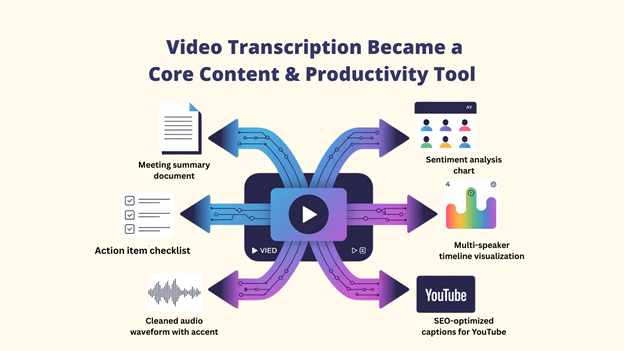
These days, the best video transcription software for meetings, podcasts, and YouTube goes well beyond simple speech-to-text capabilities.
- AI-generated meeting summaries and key takeaways
- Automatic action items and follow-ups
- Multi-speaker intelligence with timelines
- Sentiment and tone detection
- SEO-optimized captions for YouTube and podcasts
- Near-human accuracy, even with accents and background noise
This shift has made transcription a core content and productivity tool, not just a support feature.
Why the Best Video Transcription Software is Essential
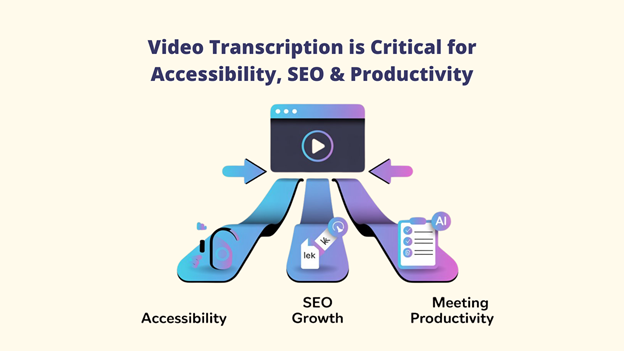
Video transcription is no longer a nice-to-have. It is critical for accessibility, discoverability, and productivity.
A: Accessibility & Inclusivity
Captions and transcripts are required by standards like ADA and WCAG. Videos with captions keep viewers engaged longer and reach more people.
Transcription helps:
- Hearing-impaired users
- Non-native speakers
- Mobile viewers watching without sound
By adding text to video, you open your content to a much wider audience.
B: SEO Benefits for YouTube & Podcasts
Search engines don’t watch videos or listen to audio; they read text. Transcription helps your content get found by:
- Improve YouTube rankings
- Make podcasts visible in Google search
- Index keywords correctly
- Support rich search results
Simply put, more text means more chances to rank.
C: Better Productivity for Online Meetings
With remote and hybrid work becoming normal, transcription tools help teams work smarter. They:
- Record meeting notes automatically
- Pull out tasks and next steps
- Let teams search past discussions in seconds
No more missed points or manual note-taking. Advanced tools like VidScribe also provide multi-language subtitles, localized voice-overs, and AI-generated voices, making content easier to scale globally.
How to Evaluate the Best Video Transcription Software
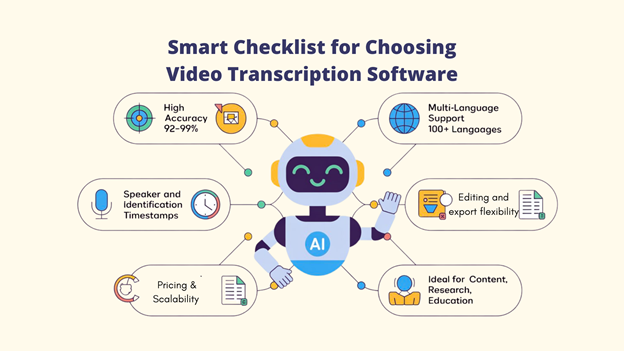
To help you choose the right video transcription software with confidence, each platform is reviewed using clear, practical criteria that matter in real use.
🎯 Accuracy & AI Speech Recognition Quality
You need video transcription software that works well in real situations, with different accents, background noise, and technical terms. The best transcription software delivers high accuracy, often between 92% and 99%, even in complex recordings.
🎯 Supported Languages & Accents
Some tools support only a few languages, while others cover 100+ languages. Quality also matters for local accents and dialects.
Cutting-edge platforms such as VidScribe assist with voice-overs, localized subtitles, and even support AI-driven ranking strategies for regional reach.
🎯 Speaker Identification & Timestamps
For meetings, interviews, and podcasts, it’s important that you can clearly see who said what and when. Accurate speaker labels and time markers make transcripts easy to follow and review.
🎯 Editing & Export Options
You should look for tools that let you edit text easily and export files in common formats like SRT, VTT, DOCX, TXT, and PDF. This makes it simple to reuse content across platforms.
🎯 Best Use Cases
The best video transcription software tools dominate in areas like content creation, team meetings, research, and education. Select software that directly meets your specific needs and usage plans.
The 8 Best Video Transcription Software
1. VIDSCRIBE - Best All-Around Video Transcription Platform

Designed to meet the demands of modern material, VidScribe is a powerful video transcription platform. It delivers high accuracy and does more than basic speech-to-text. You get smart summaries, action points, and useful insights, all in one place.
This makes VidScribe a strong choice for creators, teams, and professionals who want faster and better content workflows.
Important Features
📌 98% AI transcription accuracy
📌 AI summaries, action items & sentiment analysis
📌 Real-time transcription & collaboration
📌 Advanced speaker detection (up to 20 speakers)
📌 Text-based video editing with timeline sync
💡 Suitable for YouTubers, podcasters, remote teams, researchers, educators, marketers, and journalists who want one tool that does it all.
2. Otter – Best for Meeting Transcription & Team Collaboration

One of Otter AI's most notable features is OtterPilot, which joins Zoom, Microsoft Teams, and Google Meet calls automatically to transcribe, summarize, and extract action items even when you're not there.
The AI Chat feature allows team members to ask questions about meeting content and generate follow-ups.
Important Features
📌 OtterPilot AI meeting assistant (auto-joins meetings)
📌 Automatic meeting summaries and action item extraction
📌 Speaker identification with name tagging
📌 AI Chat for querying meeting content
📌 Email and status update generation
💡 Suitable for remote teams, sales reps, project managers, consultants, and executives who rely on actionable meeting insights.
3. Rev – Best for Human + AI Hybrid Transcription

When accuracy is crucial, Rev is the preferred platform for video transcription. Unlike AI-only tools, Rev combines AI transcription with professional human editors, delivering up to 99% accuracy, ideal for legal, medical, and compliance-critical content.
The platform's quality control process and specialized expertise in complex terminology make it worth the premium price for professionals who need flawless results.
Important Features
📌 AI + human hybrid workflow
📌 Legal, medical & technical expertise
📌 Verbatim & clean-read options
📌 Speaker labels & timestamps
📌 Captions & subtitles (SRT, VTT)
Suitable for legal, medical, research, media, and compliance teams that require guaranteed 99% accuracy.
4. Sonix – Best for Multilingual Transcription & Accuracy

By continuously providing high accuracy and ranking among the most dependable AI transcription services available, Sonixai has earned its reputation as a top-tier video transcription platform.
Combined with automated translation, highlighting, and summarization tools, Sonix is ideal for global teams and multilingual content creators.
Important Features
📌 Word-level confidence scoring
📌 AI summaries & keyword highlights
📌 Speaker labeling & collaboration tools
📌 Integrations: Adobe Premiere, Final Cut Pro, Avid
📌 Subtitle generation & full export support
Suitable for global creators, video editors, marketing teams, and organizations producing multilingual or localized content.
5. Trint - Best for Media Professionals & Journalists

Is a transcribing software developed exclusively for journalism and media companies. With good accuracy, verification workflows, and real-time collaboration, it streamlines the path from raw interviews to publish-ready content.
The platform's verification workflow allows journalists to mark sections as fact-checked, cite sources directly in transcripts, and collaborate with editors in real-time.
Important Features
📌 Text-based audio & video editing
📌 Built-in fact-checking and verification tools
📌 Real-time collaboration with comments
📌 Unlimited speaker identification
💡Suitable for journalists, newsrooms, documentary filmmakers, and media teams that need accuracy, verification, and collaboration.
6. Notta - Optimal for Quick Processing

Notta has rapidly gained popularity for its lightning-fast processing speeds and real-time transcription capabilities. Notta's mobile apps are particularly strong, making it an excellent choice for on-the-go professionals conducting interviews or capturing ideas during commutes.
Important Features
📌 Screen recording with transcription
📌 AI summarization and key takeaways
📌 Speaker identification and labeling
📌 Chrome extension for web meetings
💡Suitable for professionals, students, consultants, and mobile users who need fast, real-time transcripts under tight deadlines.
7. MeetGeek - Top Pick for Automatic Discussion Notes

MeetGeek advertises itself as more than simply video transcription software; it is an AI-powered meeting assistant that automatically records, transcribes, and provides structured summaries from your online meetings and uploaded data.
This structured approach makes reviewing meetings significantly faster than reading full transcripts.
Important Features
📌 Auto-join meeting recording
📌 AI summaries (agenda, decisions, action items)
📌 Action item extraction & assignments
📌 Speaker-labeled timestamps
📌 Integrations: Zoom, Teams, Google Meet, Slack, Notion
💡Suitable for sales teams, project managers, HR, consultants, and teams that prioritize clear meeting summaries over raw transcripts.
8. Amberscript: Ideal for Users in Europe

Amberscript has become the leading transcription platform for European users, thanks to its strong focus on GDPR compliance, multilingual support for European languages, and data centers located within the EU.
It also provides verbatim and clean-read options, giving users control over the level of detail in their transcripts.
Important Features
📌 39 languages (strong EU coverage)
📌 GDPR-compliant with EU data hosting
📌 Verbatim & clean-read options
📌 Subtitle and caption generation
📌 Speaker identification & full exports
Suitable for EU-based businesses, legal and healthcare professionals, academic researchers, and organizations with strict data privacy requirements.
Best Video Transcription Software by Use Case
🎥 Best for YouTube Captions
🏆Go for: VIDSCRIBE
- Easy YouTube integration
- SEO-friendly SRT and VTT caption files
- Unlimited storage with custom subtitle styling
💼 Best for Online Meetings
🏆 Go for: Otter
- Auto-joins meetings (OtterPilot)
- Live transcription + action items
- 300 free minutes/month
🎙️ Best for Podcasts
🏆Go for: VIDSCRIBE
- High accuracy for long audio files
- AI-generated episode summaries and sections
- No limits on episode length
📰 Best for Journalists & Researchers
🏆 Winner: Trint
- Tools for fact-checking and content review
- Designed for interviews and deep investigations
👉 Pick the tool that matches your goal, test it with real content, and start working faster and smarter.
The Future of Video Transcription
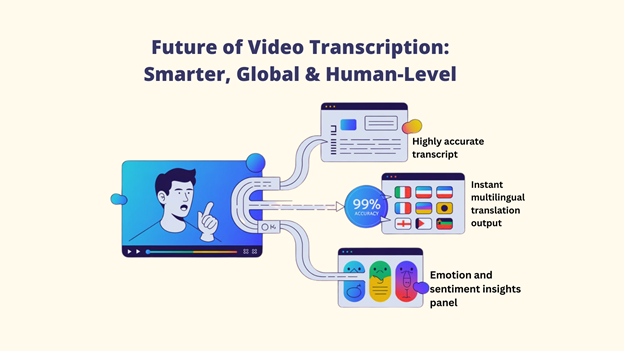
Video transcription is evolving from speech-to-text into intelligent content understanding. Here’s what’s shaping the future and why it matters to you:
🚀 AI Accuracy Is Reaching Human Level
The market for YouTube video transcription software is expected to expand from $4.5 billion in 2024 to $19.2 billion in 2034. Modern AI models now rival human accuracy in ideal conditions, driving faster, cheaper, and more scalable transcription.
👉 What this means for you: fewer edits, lower costs, faster workflows.
🌍 Real-Time Multilingual Translation
Live transcription is expanding into real-time translation. Teams speaking different languages can now view subtitles in their own language during meetings. Platforms like VIDSCRIBE are leading this shift.
👉 Why it matters: global collaboration without language barriers.
😊 Emotion & Sentiment Detection
With the right assistance, the best video transcription software can now analyze tone, intent, and emotion, not just words.
- Sales teams spot customer pain points
- Support teams track satisfaction trends
👉 Insight-driven conversations, not just transcripts.
FAQs about Best Video Transcription Software
Q: What is the most accurate Video Transcription Software ?
A: For AI transcription, VIDSCRIBE leads with 98% accuracy, followed closely by TurboScribe (98%) and Notta (96%). The accuracy gap between leading AI platforms and human transcription has effectively closed, with top-tier systems matching the benchmark under optimal conditions.
Q: Can video transcription software handle multiple speakers?
A: Yes, all modern platforms include speaker identification. VIDSCRIBE supports up to 20 speakers, Trint handles unlimited speakers, and most others comfortably manage 5-10 speakers.
Q: How does transcription software improve SEO?
A: Search engines can't watch videos but can read text. Accurate transcripts provide searchable content that helps your videos rank for relevant keywords. Transcriptions boost engagement up to 50% through improved SEO, and subtitled videos see 12% higher view counts
Q: Can I edit transcripts directly in the transcription software?
A: Yes, most platforms include editing capabilities. Text-based editors (VIDSCRIBE, Trint, and Descript) let you edit both transcript and video simultaneously; deleting text automatically removes that portion from the video.
Conclusion
Today, video transcription software entails far more than simply converting audio to text. It is about transforming conversations into clear, searchable, and actionable information.
Whether you create YouTube videos, record team meetings, or run interviews for research, there is a transcription tool that fits how you work.
The right software can improve SEO, increase accessibility, save time in meetings, and reveal key insights. That’s why choosing a tool based on your real needs as a creator, professional, or student matters more than ever.
For most users, VidScribe stands out as the best all-in-one transcription solution. Its strong support for YouTube, podcasts, and meetings makes it a smart, future-ready choice. If your main focus is meetings and team collaboration, Otter.ai works well as a supporting option.
👉 Now it’s your turn, which tool fits your workflow best?
Try one, use it with real content, and see how much faster and smarter your work can become.